Road Trip planner
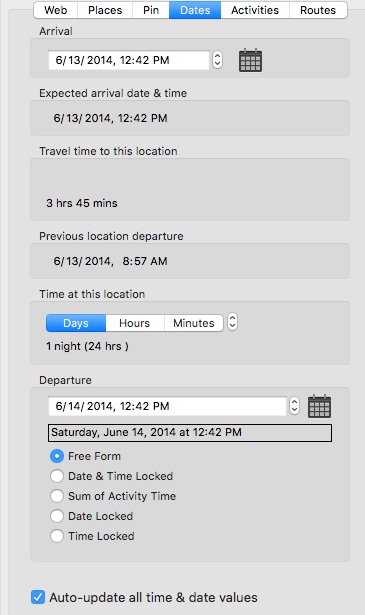
After the routes have been updated, you can better adjust your arrival and departure time and dates for each route pin location. Click on the calendar icon, or click on a date or time value to edit the value.
Auto-update route pin time and date values
If this option is enabled on the Dates pane window or in the preferences, and you adjust the time & date values for a route pin, click on each succeeding route pin to update its arrival and departure time & date values. To adjust all route pin arrival and departure date & time values at once, either click on Update Routes or select Update Route Pin Date & Time Values from the Pin menu. Each route pin’s expected arrival date & time is calculated from the previous pin’s departure date & time plus time at the location plus the travel time to the current pin location.
Departure Date & Time
Free Form - this sets the departure date & time to be calculated as the “time at this location” added to the arrival date & time.
Date & Time Locked - the departure date & time values cannot change.
Sum of Activity time - the “time at this location” values is calculated as the sum of the activity duration time values.
Date Locked - the departure date value cannot change.
Time Locked - the departure time value cannot change.
Time zones are utilized when calculating travel time starting with version 4.4. The time zone information is obtained from geonames.org.
You can change the time zone in the Preferences.
Route travel time lets you better plan your trip
Copyright © 2015 Modesitt Software. All rights reserved.